It takes the good. It kills the junk. You just drive.
Auto-Dasher watches every DoorDash offer the second it lands and judges it by your numbers. Good offers get auto-accepted before someone else grabs them. Junk gets auto-declined, both taps, finished. Borderline offers get flagged and wait for your call. And because the tapping is handled, your eyes stay where they belong: on the road.
Free to download. Free for 14 days. Then $4.99 once, forever. See pricing
14 days
Free trial
$4.99
Once. Not monthly
0
Data leaves your phone
EN · ES
English and Spanish
Good offers inJunk offers out Your rules, every offer Close calls are your call No subscription No internet. No tracking. Eyes on the roadGood offers inJunk offers out Your rules, every offer Close calls are your call No subscription No internet. No tracking. Eyes on the road
The film
Sixty seconds. That is the whole pitch.
What it does, what it costs, and why your thumbs can retire.
The verdicts
Every offer, judged in one second.
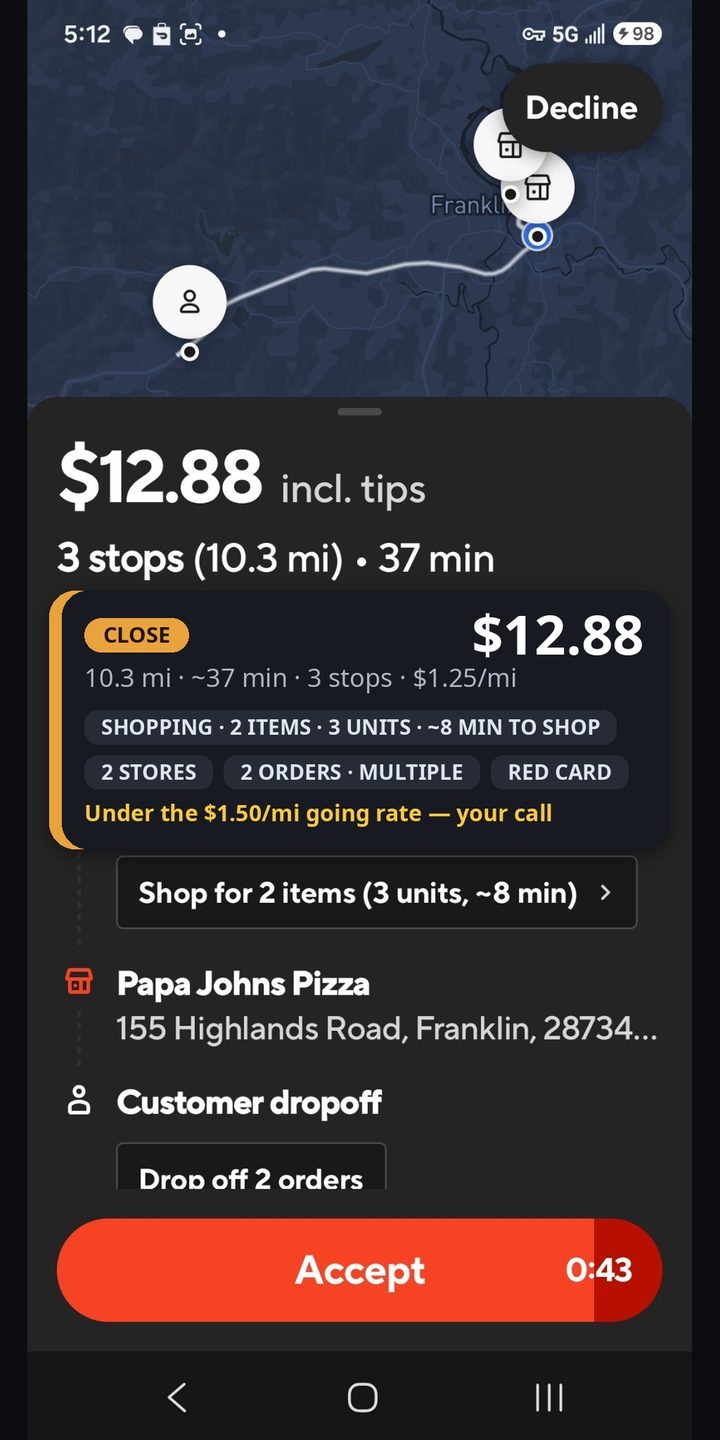
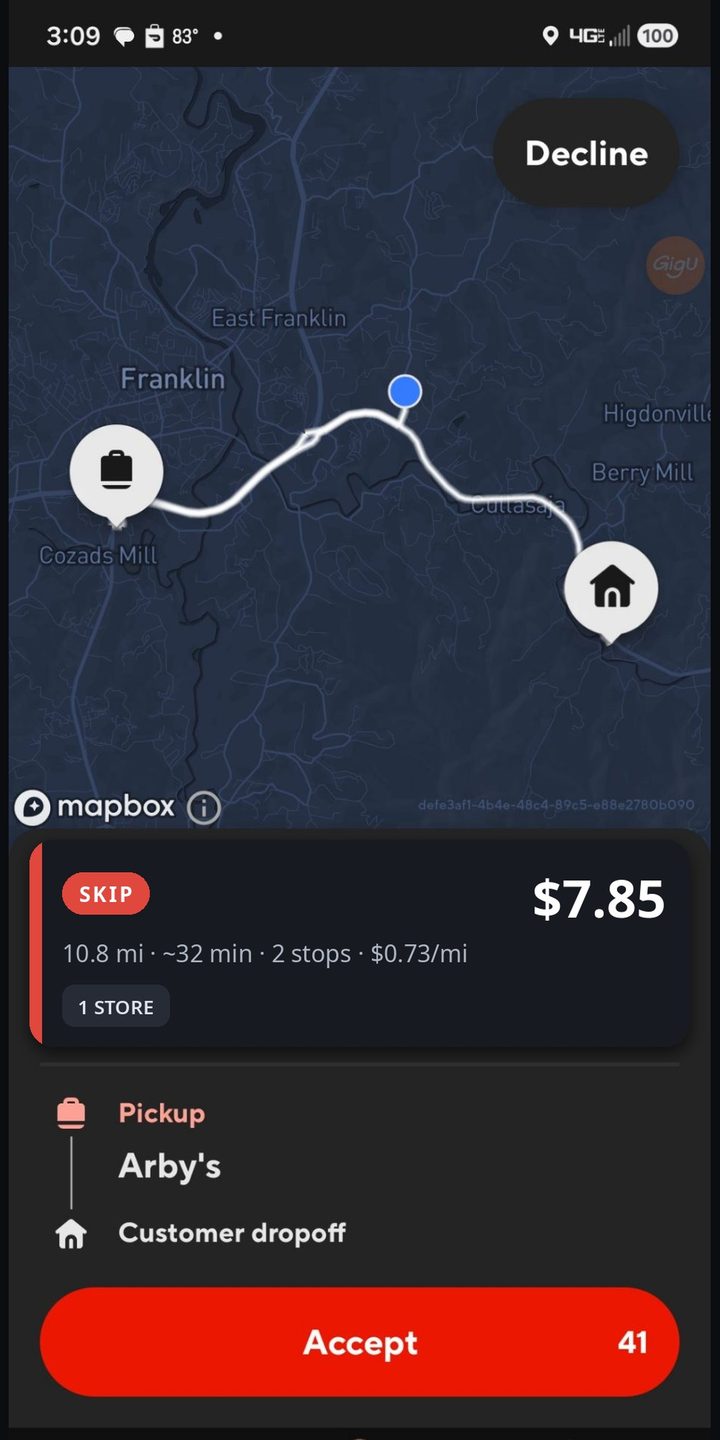
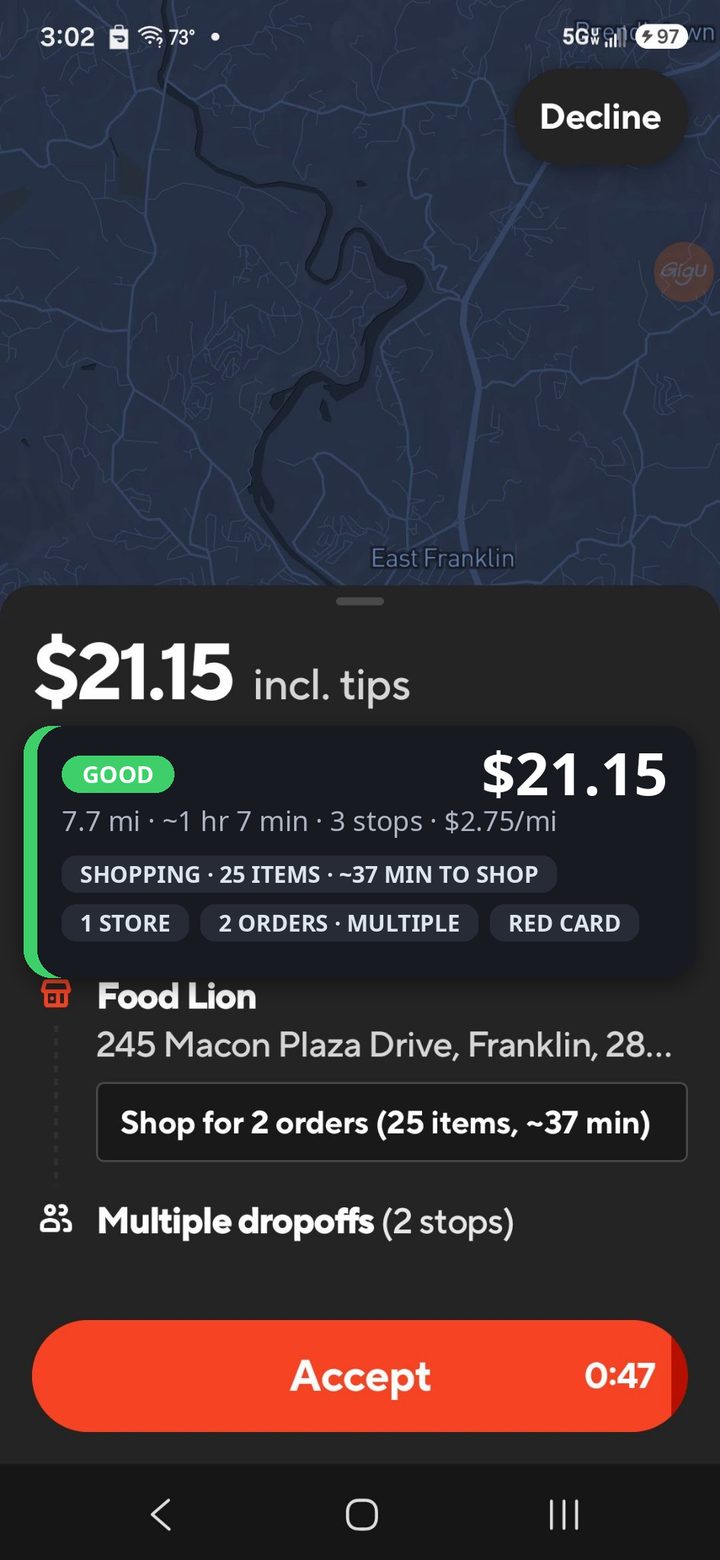
A big banner lands center screen with the pay, the distance, the estimated time, the stops and the dollars per mile, plus the fine print DoorDash hopes you will not do math on: shopping load, store count, stacked orders, Red Card runs. These are real screenshots from a real shift in Franklin, North Carolina.
GOOD
Take it. Already taken.
Pays at or above your going rate per mile and clears every bar you set. In full-auto mode it is accepted inside your delay range, before the next driver even looks up.
The rule: pay clears your minimum, rate beats your going rate, and no cap is crossed. The banner shows first, and one tap cancels the auto-accept.
CLOSE
Your call. You have 30 seconds.
Borderline is not junk, so Auto-Dasher does not bin it. The amber banner counts down 30 seconds. Tap it and the offer is yours. Do nothing and it declines itself, cleanly.
The rule: between your floor and your going rate, under your minimum but rescued by a great rate, or stacked. Stacked offers are never auto-accepted, ever.
SKIP
Junk. Declined for you.
Under your floor rate, or over one of your caps. It dies quietly inside your delay range, no touching your phone, and the decline is finished properly: both of DoorDash's taps, the card and the confirm screen.
The rule: a stated number over your cap is a hard fail: too many miles, items, units, or minutes. An offer that hides a number cannot fail on it.
Your rules, your call
Set your numbers once. The app holds the line.
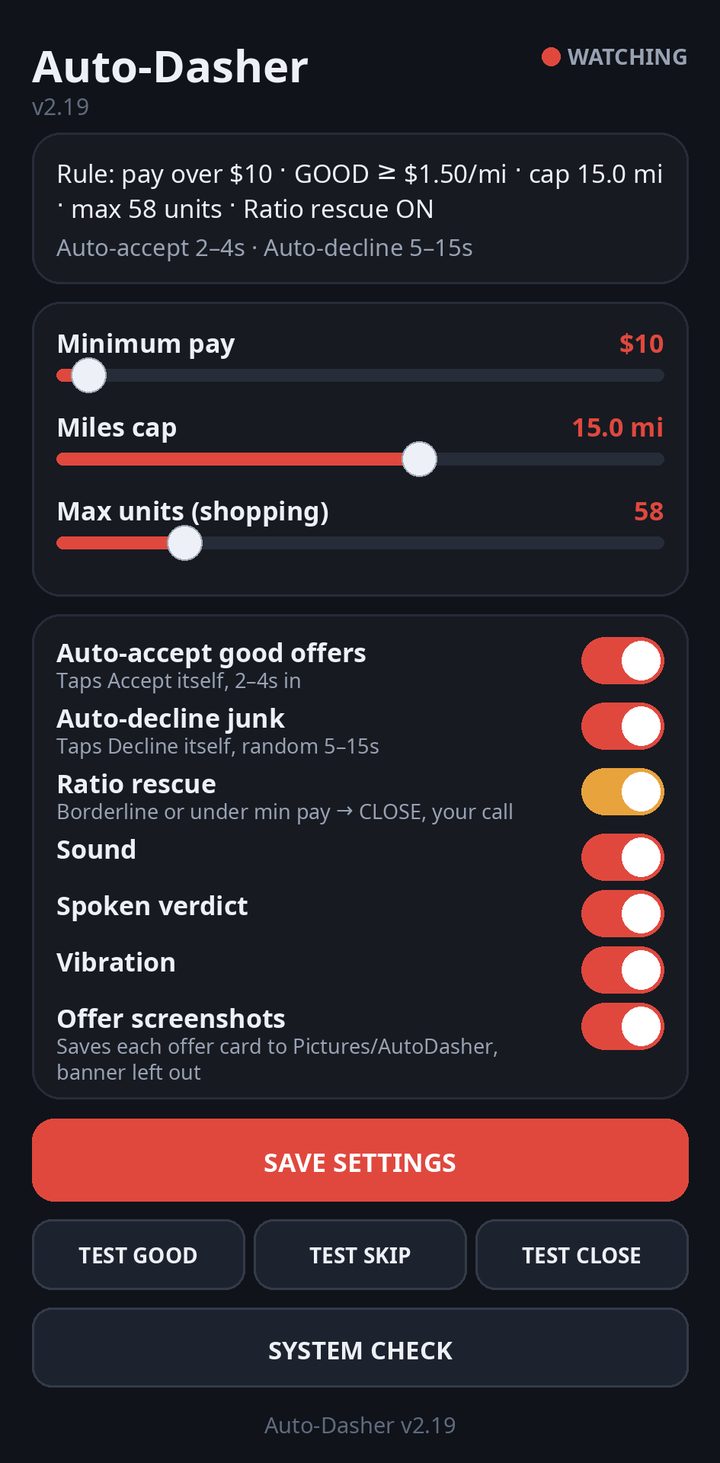
Nothing here is DoorDash's idea of a good offer. Every threshold is a slider you set at home, and full control stays with you: alert only, auto-decline, or full auto. Start cautious. Graduate when you trust it.
Minimum pay
The least an offer can pay and still be GOOD. Below it, only a great rate can rescue the offer into a CLOSE call.
Max miles
Your distance cap. A stated distance over it is a hard SKIP, no matter how good the pay looks.
Max items
The biggest shopping list you will push a cart for, counted in items. Sits directly above Max units, where it belongs.
Per-mile rates
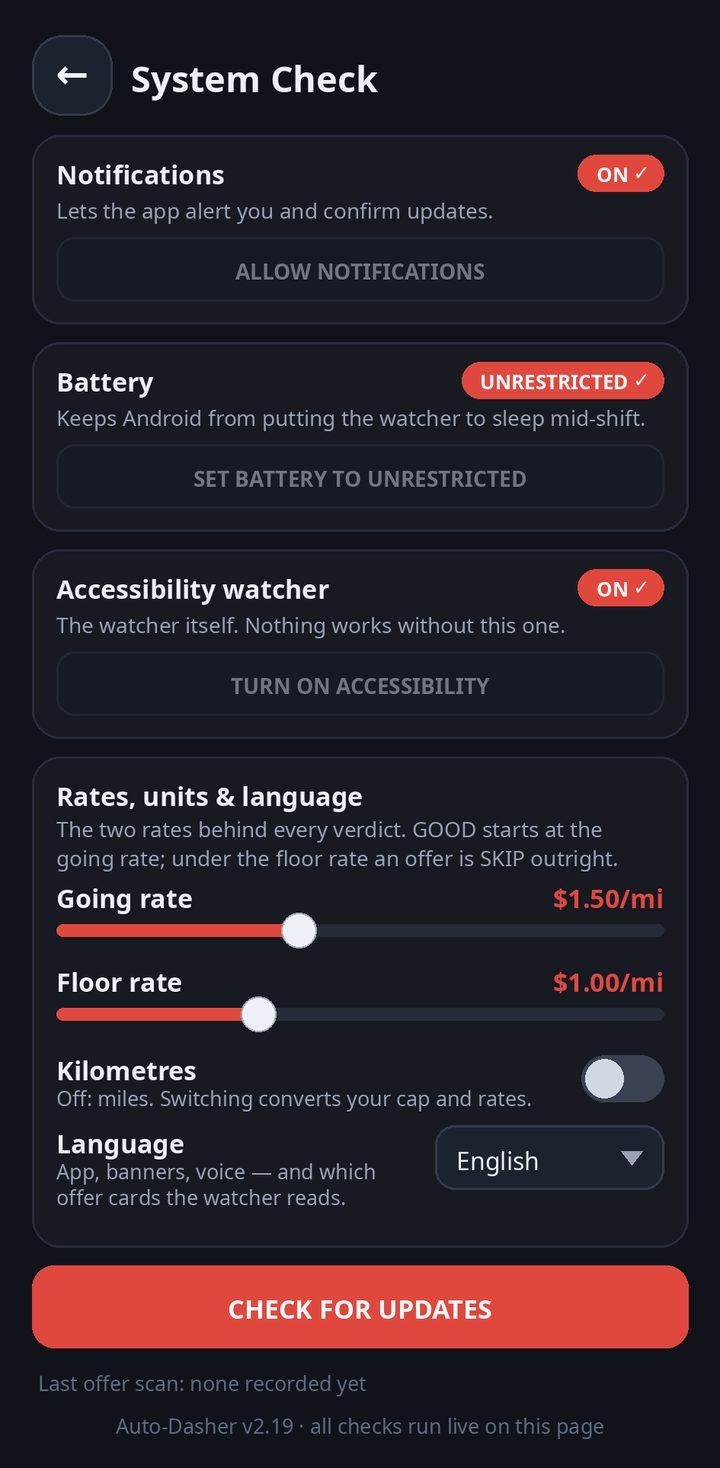
Your going rate and your floor rate in dollars per mile. Defaults: $1.50 going, $1.00 floor. Both are yours.
Max units
The same shopping cap counted in units, for the orders that think in cases and gallons instead of items.
Max total time
A cap on the offer's stated minutes, shopping and driving together. Off by default. Turn it on and slow offers fail fast.
Delay sliders, 2 to 30 seconds
Auto-accept and auto-decline each get their own minimum and maximum delay, anywhere from 2 to 30 seconds. The app picks a moment inside your range, so the pace looks like a person, because the rules are a person's.
Ratio rescue, your switch
An offer under your minimum pay with a strong per-mile rate gets rescued into a CLOSE call instead of the bin. Do not want rescues? The switch turns it off, and those offers are plain SKIPs.
Sound, voice, and a paper trail
A spoken verdict and a buzz you can tell apart by feel, in English or Spanish. And a clean screenshot of every offer card, saved to your own Pictures folder. What DoorDash sent, what you took, what you refused.
One-minute setup, one-page health check
The System Check page shows the few switches Android makes you flip yourself, each with a live status and a button that takes you straight to the right setting. Miles or kilometers, your choice.
New in 2.25 and 2.26
Daily History: what you made, what you refused.
Tap DAILY HISTORY and every day gets its own ledger: the offers you took against the offers you passed, with the cost of the road figured in.
Taken: count, total pay, total miles. Then the honest math: expense at the federal mileage rate of $0.76 a mile, and your actual earned after it. A day that cost more than it paid shows negative. No makeup on it.
Passed: count, the pay you gave up, and the miles you saved, plus the cost saved by not driving them. Every declined offer shows both sides of the decision.
The last 20 days, kept on your phone and nowhere else. It only counts outcomes the app actually saw, and the pay is the amount printed on the offer card when it was decided. Extra tips DoorDash adds later are never invented into your record.
Monday, November 23Example day
Taken: 4 offers · 18.3 mi$52.40
Expense · 18.3 mi at $0.76-$13.91
Actual earned$38.49
Passed: 9 offers · $71.85 given up$0.00
Miles saved · 64.2 miCost saved $48.79
Totals cover the offers Auto-Dasher handled and saw the outcome of. Only the last 20 days are kept, on this phone only.
Safety
Will it get my account deactivated? Read exactly how it works.
It is the right question to ask, so here is the whole mechanism, with nothing hidden. Auto-Dasher reads the offer card that is already on your screen, using Android's built-in Accessibility feature: the same Google technology that powers screen readers for blind users. It reads the pay, the miles and the time, and compares them with rules you set. When auto-accept or auto-decline fires, it presses the same Accept and Decline buttons, on the same screen, that your own finger would press.
✕
It never touches the DoorDash app
No modifying, patching, or injecting anything into the Dasher app or its code. The app DoorDash shipped is the app that runs.
✕
It never fakes anything
No fake location, no spoofed taps behind DoorDash's back, no changed offers. It cannot see anything DoorDash did not already show you.
✕
It never sees your account
No password, no login, no account access of any kind. It reads a card on a screen. That is the entire relationship.
✕
It never phones home
It collects nothing and sends nothing. The Google Play version has no internet permission at all, so it physically cannot transmit your data anywhere.
The honest line, in writing: no third-party app can make promises on DoorDash's behalf. What we can do is show you precisely how this one works. A second pair of eyes, reading what is on your screen, following your rules. That is all it is.
And the part that actually matters: every dasher knows the moment. Traffic has your full attention, a ping lands, and by the time you can look, the good one is gone. Or worse, you look. Auto-Dasher exists so you never have to choose between a good offer and the road.
Privacy
Nothing leaves your phone. It cannot.
The Google Play build of Auto-Dasher does not include the INTERNET permission. Not "we promise not to send your data." It has no way to send it. Your rules, your history, and your offer screenshots live on your device, under your hand.
0
Internet permission in the Play build. No network, no phone home, no exceptions.
0
Accounts, sign-ups, analytics, ads, or third-party trackers. None exist in the app.
20 days
Of Daily History, stored only on your phone, then the oldest day falls off.
Five dollars. Once. That is the whole pricing page.
FREE
Download
→
14 DAYS
Free trial, every feature on
→
$4.99
One-time unlock
→
YOURS
Forever
→
NO
Subscription · No ads
No card to start the trial. No account. It only has to save you from one trap offer, or land you one good one you would have missed in traffic, and it has paid for itself. After that, it is profit. The other guys charge $4.99 a month. Forever. Do that math at a red light.
Closed testing
It is not public yet. Testers are the door.
Auto-Dasher is in closed testing on Google Play while it earns its production release. Testers get it free forever, and right now, testers are the only way in.
12 testers · 14 days
Google's production gate: 12 testers opted in and installed, held for 14 straight days. There is no cap on joining. The more testers, the better.
1
Join the tester group
The Auto-Dasher Tester Group on Google Groups. That is the crew, the bug reports, and the update news.
2
Opt in on Google Play
Open the testing opt-in page with the same Google account and tap Become a tester. Joining the group alone does not count until you opt in.
3
Install and set it up
Install from Google Play, run the System Check, and turn on the watcher. Stay installed and opted in for the full 14 days.
4
Tap TRIAL, unlock forever
No promo codes anymore. Tap the TRIAL button and complete the purchase: as a tester, Google runs it as a test purchase. No charge, and the app is unlocked forever.
Will Auto-Dasher get my DoorDash account deactivated?+
Here is exactly what it does: it reads the offer card already on your screen through Android's Accessibility feature, the same technology behind screen readers, and presses the same Accept and Decline buttons your finger would press. It never modifies the Dasher app, never fakes your location, and never sees your password or account. And the honest line stands: no third-party app can promise anything on DoorDash's behalf. The full breakdown is in the Safety section.
What does it cost?+
Free to download, free for 14 days with every feature on, then a one-time $4.99 unlock. No subscription, no ads, no card needed to start the trial. Testers keep it free forever: tap the TRIAL button and complete the purchase, and Google runs it as a test purchase at no charge.
Is there an iPhone version?+
No. Auto-Dasher is Android only. It is built on Android's Accessibility system, and iOS offers nothing equivalent for an app like this. Anyone selling you an iPhone version is not selling you this app.
What data does it collect?+
None. The Play build has no internet permission, so it cannot send anything anywhere. No account, no analytics, no trackers. Your settings, your Daily History, and any offer screenshots stay on your phone. See the Privacy Policy.
Does it speak Spanish?+
Yes. The whole app, banners and spoken verdicts included (BUENA, CERCA, PASAR), in English or Spanish. Miles or kilometers, your choice.
What if it reads an offer wrong?+
If an offer is confusing, Auto-Dasher never guesses: it flags it and leaves the call to you. Every auto action is announced on a banner first, and one tap cancels it. If it ever calls one wrong, post the offer in the tester group. That is how the reading gets better.
Does it work for Uber Eats or other apps?+
No. Auto-Dasher reads the DoorDash Dasher app only. It does not read your other apps, your messages, or anything else on your phone.
 AUTO